



Back in 2018, Salesforce introduced “platform events”. The company took inspiration from Kafka and even created a metadata repository that allowed schemas to evolve. Alexey Syomichev wrote a nice article about it, which you can read here.
At first glance, this looks like the perfect way to integrate Salesforce with Kafka. However, in my experience it is not that straightforward. There are some limitations and best practices to consider, which I’ll discuss in this blog.
Kafka connector
Let’s start with the Salesforce Platform Event Source and Sink connectors for Salesforce. These areis is a Confluent endorsed connector s that requires a Confluent enterprise license key and comes with enterprise-level support. You can find the relevant documentation here.
The Salesforce Source connector can capture changes from Salesforce through Salesforce Enterprise Messaging Platform Events, which are user-defined publish/subscribe events. The Change Data Capture feature provides a way to monitor Salesforce records.
Integration using platform events is recommended, but not always possible depending on your use case. Before platform events became available, Salesforce used push topics, which are now considered legacy. Platform events can be custom events (events defined by yourself) or standard events, which Salesforce defines, including Real-Time Event Monitoring events.
Platform events are sent asynchronously. In API version 45.0 and later, new custom event definitions are high volume by default. High volume means millions of updates for Salesforce, but we lack further benchmarks, so this remains to be tested and reviewed depending on your use case. If you have experience with a high number of events, please reach out and let us know.
Limits
Depending on your subscription, there are some limits to using the connector. These limits often change, so they need to be verified together with your Salesforce subscription. For more information, check out this page.
For example, the connector’s limits prevented us from using it to integrate Salesforce and Kafka at a client in 2023. We needed events for all customer records that were updated, and we had about one million customers in Salesforce.
To solve this, we had to implement a service that polls Salesforce every 30 seconds for changes. This approach allowed us to get a paginated list of changes in one request which made it possible to scale the number of requests to the allowed amount.
The SINK connector, which sends events from Kafka towards Salesforce, also has its limitations. The Platform Events sink connector requires the Kafka records to have the same structure and format as those sent by the Platform Events source connector.
Updating multiple Salesforce records based on one business event cannot be done out-of-the-box. However, you can create a separate service that streams your business events from Kafka and creates specific topics on Kafka, containing the exact events that Salesforce expects.
Apache Flink or KStreams are good streaming frameworks processors that can facilitate the transformation. This streaming logic will beis specific for Salesforce, so I would suggest that the Salesforce team in your organization also maintains this service.
In conclusion, using the connector is probably not advised for high volumes or more complex use cases if you do not have the subscription to support it.
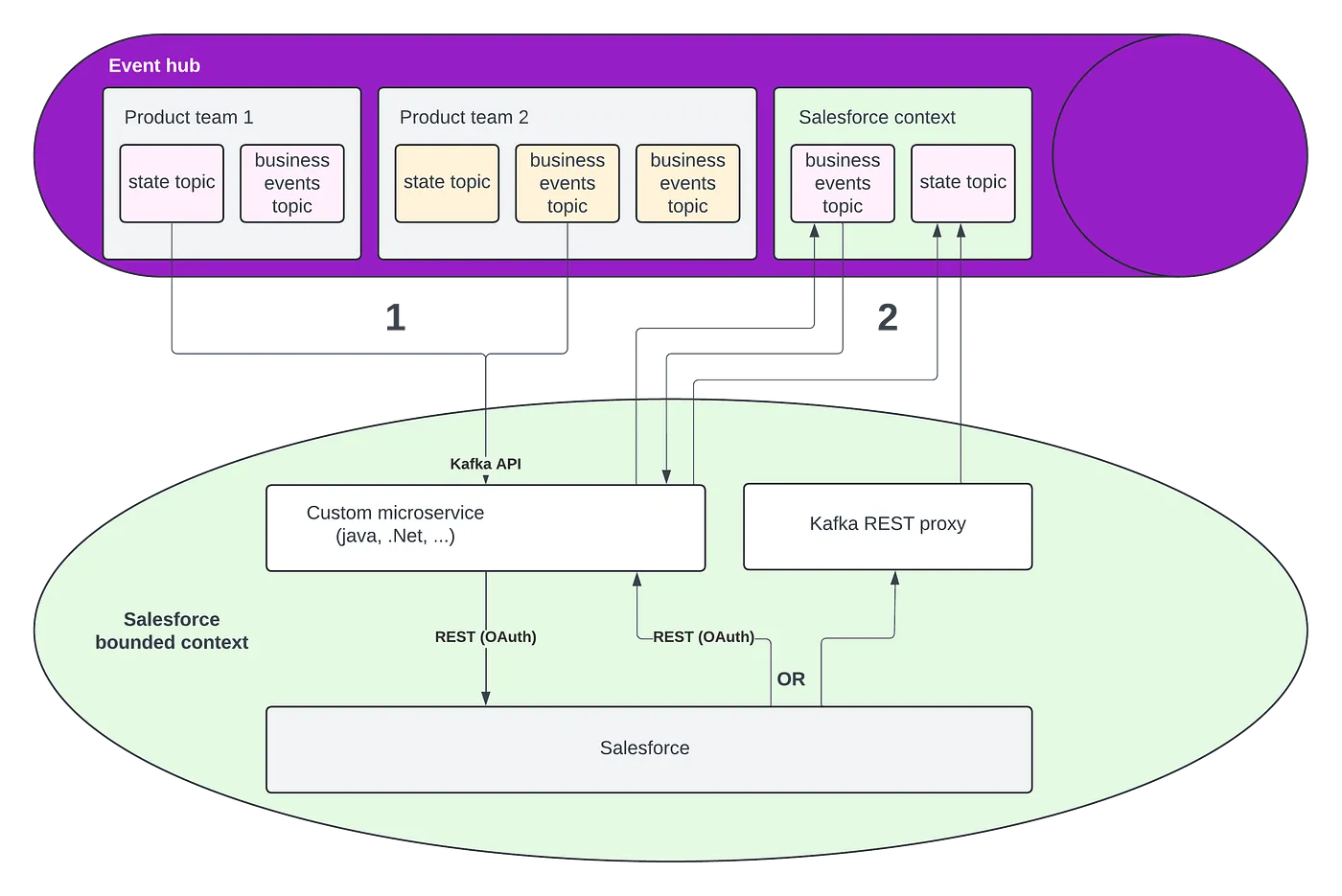
Salesforce EDA reference architecture
The diagram below illustrates how to best integrate a Kafka cluster (or an event hub that supports the Kafka API) with Salesforce without using Kafka connect. This two-stage solution requires creating a custom microservice, but this also offers maximal flexibility.